> ## Documentation Index
> Fetch the complete documentation index at: https://phaseo.app/docs/llms.txt
> Use this file to discover all available pages before exploring further.
# Zed
> 在 Zed 中将 Phaseo 添加为兼容 OpenAI 的模型供应商。
使用 Phaseo CLI 将提供商和模型添加到 Zed,然后把密钥保存到 Zed 的钥匙串中。如不使用 CLI,请手动输入相同的提供商值。
## 使用 Phaseo CLI 设置
```bash theme={null}
phaseo login
phaseo zed --model openai/gpt-5.6-terra
```
CLI 将提供商 ID `phaseo`、API URL `https://api.phaseo.app/v1` 和所选模型添加到 Zed 的 `settings.json`,不会更改无关设置。
## 在 Zed 中完成设置
Zed 会将供应商密钥存储在系统密钥链中,因此只剩这一步界面操作。
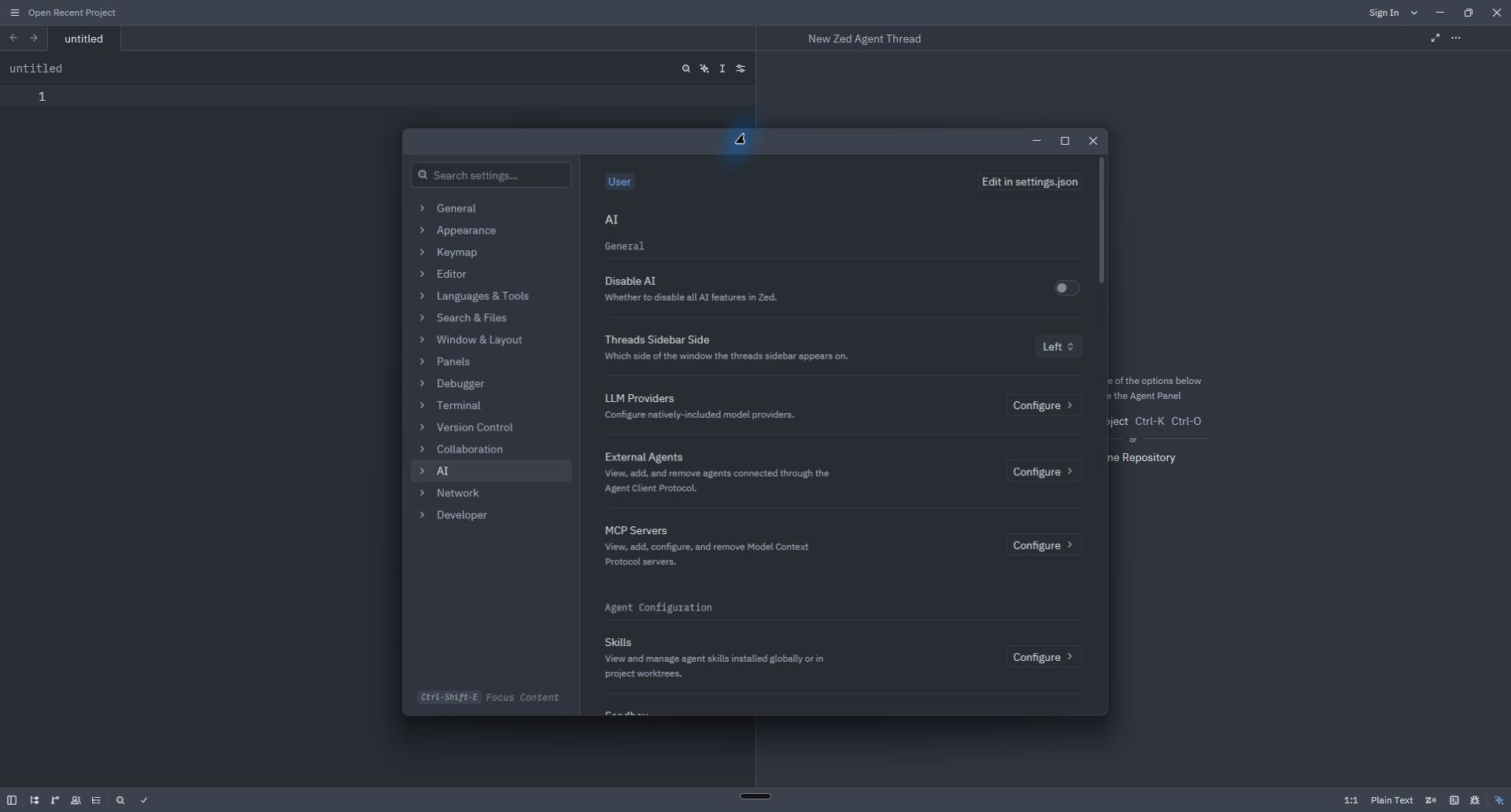
1. 打开命令面板并运行 **agent: open settings**。
2. 在 **AI** 下选择 **LLM Providers → Configure**。
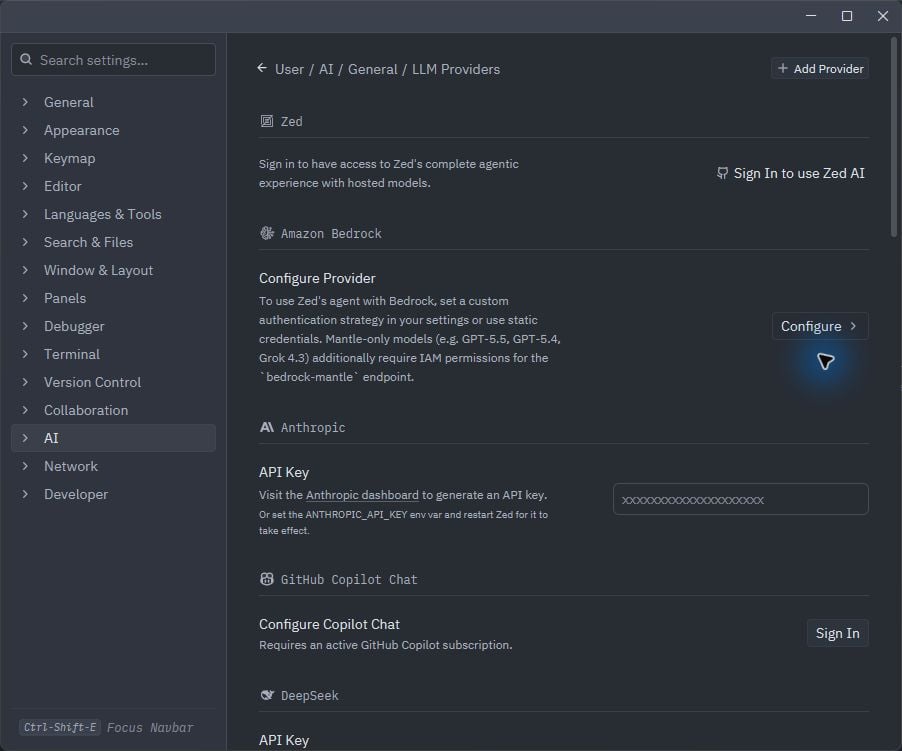
 3. 如果已显示 Phaseo,请打开并粘贴专用密钥。否则选择 **Add Provider → OpenAI**。
 4. 如需手动配置,请填写:
| 字段 | 值 |
| - | - |
| Provider Name | `Phaseo` |
| API URL | `https://api.phaseo.app/v1` |
| API Key | 以下命令的输出 `phaseo integrations credential zed` |
| Model Name | 所选 Phaseo 模型 ID |
4. 如需手动配置,请填写:
| 字段 | 值 |
| - | - |
| Provider Name | `Phaseo` |
| API URL | `https://api.phaseo.app/v1` |
| API Key | 以下命令的输出 `phaseo integrations credential zed` |
| Model Name | 所选 Phaseo 模型 ID |
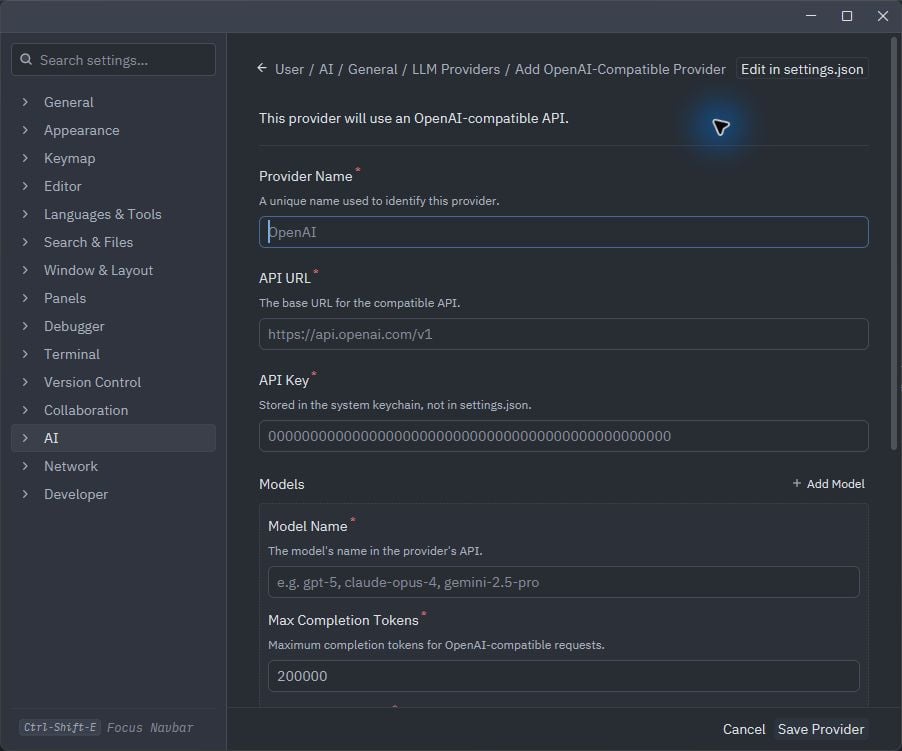 请先填写 Base URL、模型 ID 和密钥,然后再选择 **Save Provider**。
## 验证
打开新的 Agent 线程,选择 Phaseo 模型并发送简短请求。如果 Zed 提示密钥无效,请重新运行 `phaseo integrations credential zed` 并替换 Zed 中保存的密钥。
## 移除
```bash theme={null}
phaseo integrations remove zed
```
CLI 会从 `settings.json` 中移除 Phaseo 供应商并撤销其专用密钥。如果 Zed 仍显示旧的密钥链条目,也请从 **LLM Providers** 中移除 Phaseo。
This documentation is built and hosted on [Mintlify](https://mintlify.com), a developer documentation platform.
请先填写 Base URL、模型 ID 和密钥,然后再选择 **Save Provider**。
## 验证
打开新的 Agent 线程,选择 Phaseo 模型并发送简短请求。如果 Zed 提示密钥无效,请重新运行 `phaseo integrations credential zed` 并替换 Zed 中保存的密钥。
## 移除
```bash theme={null}
phaseo integrations remove zed
```
CLI 会从 `settings.json` 中移除 Phaseo 供应商并撤销其专用密钥。如果 Zed 仍显示旧的密钥链条目,也请从 **LLM Providers** 中移除 Phaseo。
This documentation is built and hosted on [Mintlify](https://mintlify.com), a developer documentation platform.